Reset IPTV app protocols are essential for any user experiencing buffering, login failures, or outdated content libraries on their streaming device. At IPTV Smarters Pro, we understand that nothing ruins a weekend football match with friends or a quiet evening of cartoons with the kids like a technical glitch. Whether you are renewing your subscription or simply need a fresh start to clear out system lag, performing a clean reset is the most effective technical solution to restore peak performance.
Why Your IPTV App Needs a Reset
Over time, streaming applications accumulate large amounts of “cache” and “data” which can lead to slow response times, app crashes, and synchronization errors. For our USA audience, where high-definition 4K streaming is the standard, these glitches can be particularly frustrating. Resetting your application ensures that all temporary files are purged, allowing the software to establish a clean handshake with the servers. This guide provides a technical walkthrough on how to refresh your service and get back to enjoying uninterrupted entertainment.
Common Signs You Need to Reset Your IPTV App
Before diving into the steps, identify if your app is showing these symptoms:
-
Authentication Errors: The app refuses to accept valid login credentials after a renewal.
-
EPG Issues: The Electronic Program Guide is blank or not updating.
-
Constant Buffering: High-speed internet is available, but the stream keeps freezing.
-
App Crashes: The application closes unexpectedly when loading specific channel categories.
Step-by-Step Guide: How to Reset IPTV App (IPTV Smarters Pro)
Based on technical best practices for Fire Stick, Android TV, and Google TV devices, follow these steps to perform a complete reset.
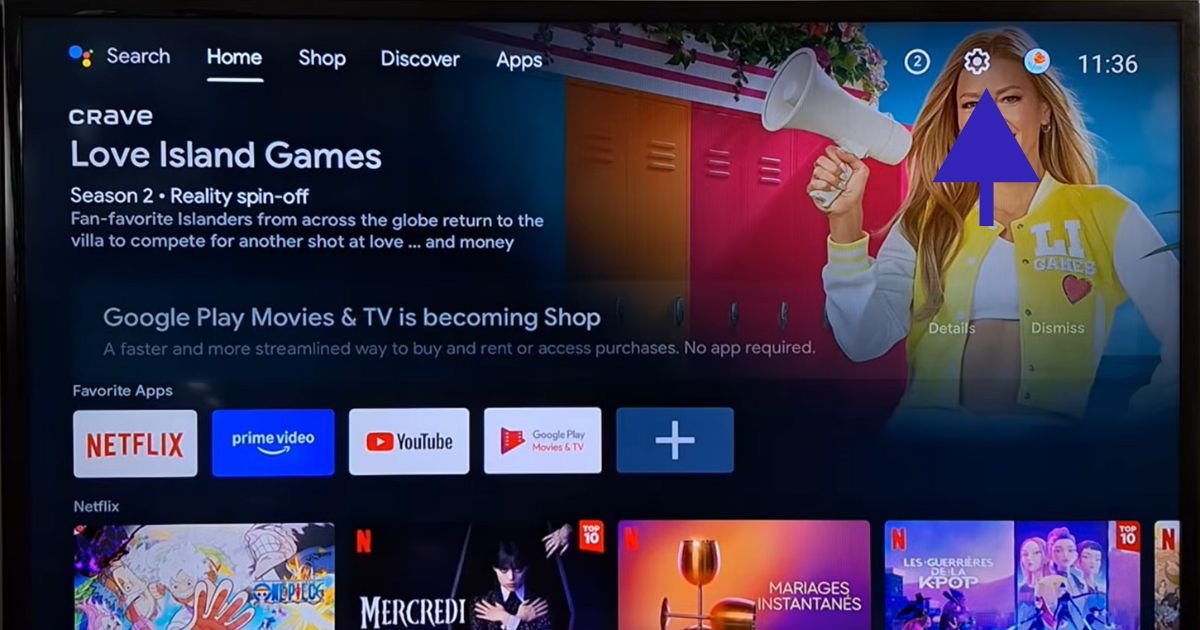
1. Access Your Device Settings
Navigate to the home screen of your streaming device (Firestick, Android Box, or Smart TV). Locate and select the Settings (gear icon) menu.
2. Locate Application Management
Within the settings menu, scroll down and select Apps or Applications. Then, click on See all apps to view the full list of software installed on your device.
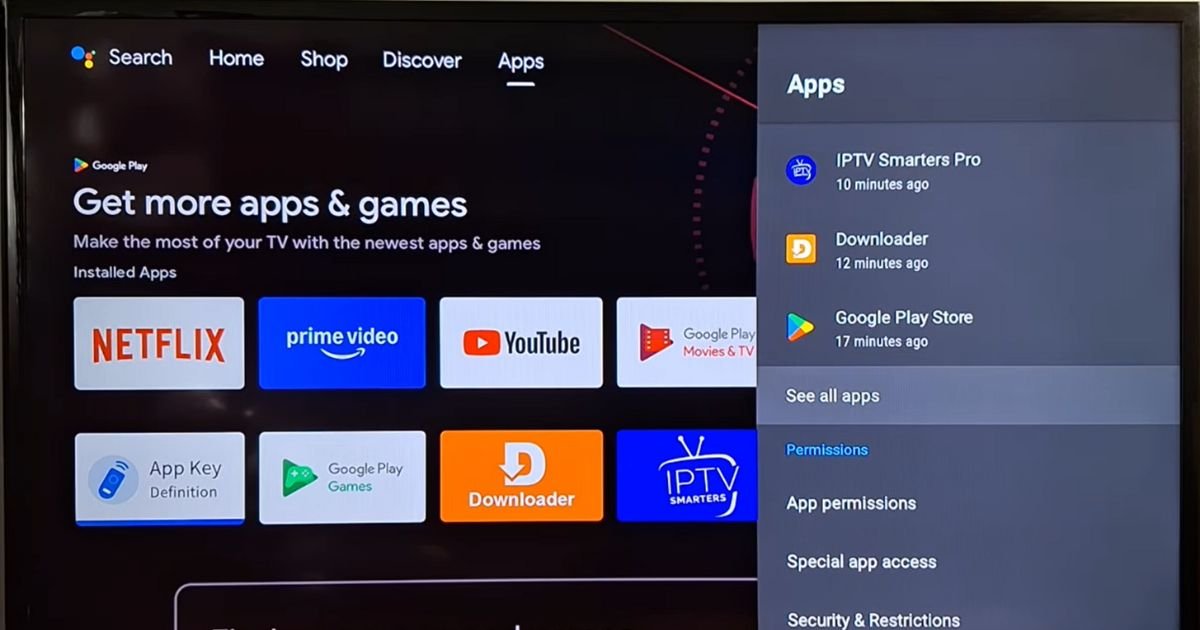
3. Select IPTV Smarters Pro
Scroll through your list of installed applications until you find the IPTV app. Click on it to open the specific application settings.
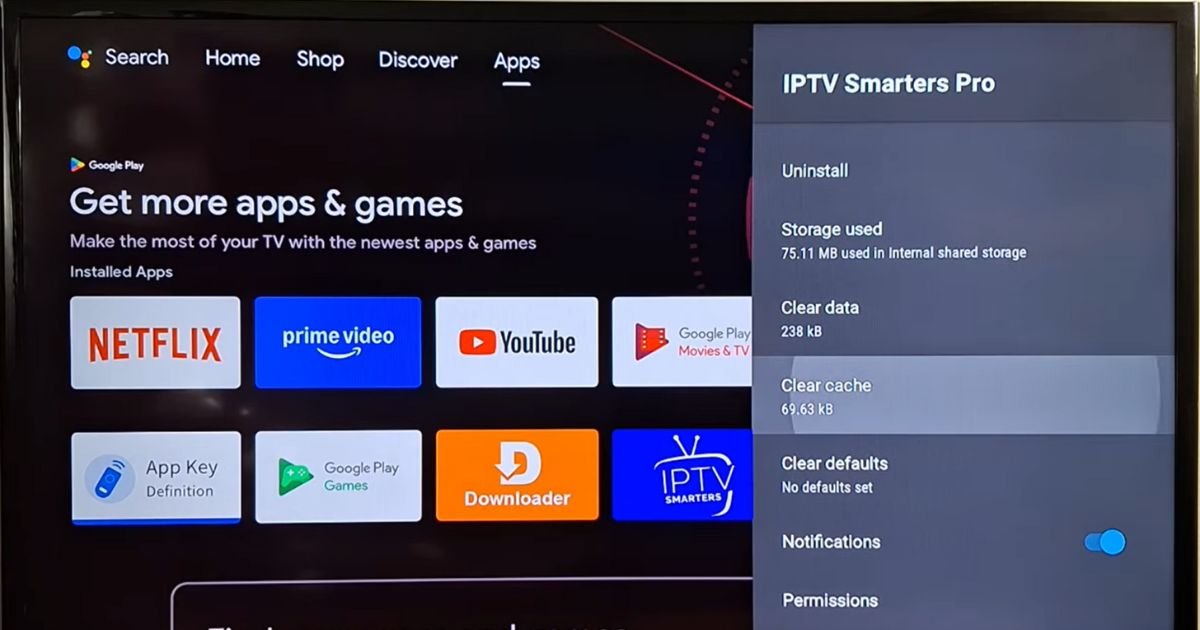
4. Clear Cache and Data (The “Soft” Reset)
This is the most effective way to fix glitches without removing the app.
-
Clear Cache: Select “Clear Cache” first. This removes temporary files while keeping your login info.
-
Clear Data: Select “Clear Data.” Note: This will erase all settings, favorites, and login details. It essentially returns the app to its factory state, making it perfect for subscription renewals.
5. Uninstall and Reinstall (The “Hard” Reset)
If clearing data doesn’t fix the glitch, you can choose to Uninstall the app entirely from the same menu. After removing it, go back to your app store or downloader and reinstall a fresh version of IPTV Smarters Pro.
Pro-Tricks to Improve Your IPTV Experience
To ensure you and your family enjoy the best possible stream for movies and live matches, consider these optimizations:
-
Check with your Provider: Before resetting, ensure you have your active login codes or M3U URLs ready to re-input.
-
Use a Wired Connection: Whenever possible, use an Ethernet adapter for your Firestick or Android TV to minimize interference.
-
Update Firmware: Ensure your streaming device’s OS is up to date to maintain compatibility with the latest app versions.
Conclusion
Learning how to Reset IPTV app is a vital skill for the modern cord-cutter. It resolves the majority of software-side glitches and is a mandatory step when you renew your service with IPTV Smarters Pro. By following this step-by-step guide, you ensure that your household stays entertained with crystal-clear matches, movies, and cartoons without the headache of technical interruptions.
Contact Us for Expert Support
Are you still experiencing issues after a reset? Our team at IPTV Smarters Pro is dedicated to our USA audience. We are available 24 hours a day to help you resolve any streaming difficulties or account issues. [Contact Our Support Team Today] – We’ll get you back to your favorite content in no time!
FAQs: Troubleshooting IPTV for USA Users
Q1: Will resetting my IPTV app delete my subscription?
No. A reset only clears the local files on your device. Your subscription remains active on the server side; you will simply need to re-enter your credentials to log back in.
Q2: Why is my IPTV Smarters Pro app still buffering after a reset?
If a reset doesn’t help, the issue might be your internet speed or your ISP throttling the connection. We recommend testing your speed or using a VPN to see if performance improves.
Q3: How often should I clear the cache on my app?
For the best performance, we recommend clearing the cache once every month to prevent the buildup of unnecessary data that causes lag.
Q4: I lost my login details after “Clear Data,” what do I do?
If you cleared your data and don’t have your credentials, please contact our 24/7 support desk immediately, and we will help you retrieve your account information.