To successfully Set up IPTV on Apple TV 4K, you need a reliable player that can handle the high-bitrate streams common in the US market. While “IPTV Smarters Pro” is the official brand, on the Apple App Store, it is often listed under the name Smarters Player Lite.
Phase 1: Installing the Correct App
Apple has strict guidelines, so the app interface may look slightly different, but the power behind it remains the same.
-
Open the App Store: Use your Siri Remote to navigate to the App Store on your Apple TV home screen.
-
Search for the Player: Type in “Smarters Player Lite” in the search bar. You will see an icon with a blue television and the “Smarters” branding.
-
Download and Launch: Select “Get” to install the app. Once installed, click “Open” to enter the configuration menu.
Phase 2: Configuring Your IPTV Login
Once the app is open, you must connect it to your service provider. For the best performance on Apple hardware, we recommend using the Xtream Codes API method rather than a standard M3U URL.
-
Select Login Method: On the main screen, choose “Login with Xtream Codes API”.
-
Enter Your Credentials: Carefully input the details provided in your activation email:
-
Any Name: (e.g., “My USA IPTV”)
-
Username: (Your unique ID)
-
Password: (Your secure password)
-
Server URL: (e.g.,
http://yourprovider.com:8080)
-
-
Add User: Click “Add User” to load your 4K channel list and VOD library.
Why This Setup is #1 in the USA
USA users demand reliability, especially during high-traffic events like NFL games or Hollywood premiere releases. By choosing to Set up IPTV on Apple TV 4K with our official service, you benefit from:
-
Silicon Integration: The Apple A-series chips provide the fastest channel-switching (zapping) speeds in the industry.
-
4K Upscaling: Even if a channel is in 1080p, the Apple TV 4K hardware works with our high-speed servers to provide a crisp, upscaled image.
-
Safety & Privacy: Apple’s secure environment, combined with our encrypted streams, ensures your data remains private.
IPTV Smarters Pro vs. TiviMate vs. XCIPTV: Which is Best for USA Users?
In the USA market, choosing the right player for your Apple TV 4K or ONN TV determines how much you enjoy your 4K content. While IPTV Smarters Pro is the most famous for its user-friendly interface, power users often compare it to TiviMate and XCIPTV.
Below is a breakdown of how these top-tier players compare in 2026:
| Feature | IPTV Smarters Pro (Smarters Player Lite) | TiviMate | XCIPTV |
| Best For | All-in-One Experience | Live TV & EPG Lovers | Clean, Modern UI |
| USA Popularity | #1 (Most Known) | High (Hardcore Streamers) | Medium (Clean Layout) |
| Device Support | iOS, Apple TV, Android, Firestick, PC | Android TV/Firestick Only | Android TV/Firestick Only |
| Interface | Dashboard Style (Movies/TV/Live) | Classic Cable Box Style | Graphic-Heavy Tiles |
| Setup Ease | Very Easy (Xtream Codes) | Advanced (Steep Curve) | Easy |
| Multi-Screen | Yes (Up to 4 Screens) | Yes (Premium Version) | Yes |
| Our Rating | ⭐⭐⭐⭐⭐ | ⭐⭐⭐⭐ | ⭐⭐⭐⭐ |
Official IPTV Smarters Pro USA: 5-Step Troubleshooting Checklist
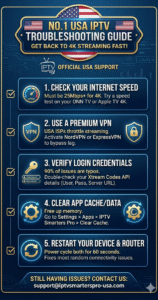
Keep this guide handy! If you experience buffering, connection errors, or login failures, follow these steps in order to fix 90% of all issues instantly.
☐ Step 1: Check Your Internet Speed
-
The Issue: Buffering on 4K or HD channels.
-
The Fix: Your streaming device must receive at least 25 Mbps for stable 4K playback (10 Mbps for standard HD). Use a “Speed Test” app directly on your Apple TV 4K or ONN TV (not your phone). If speeds are low, move your router closer to the device or use an Ethernet cable.
☐ Step 2: Activate a Premium VPN
-
The Issue: High internet speed on tests, but buffering persists—especially during live USA sports (NFL, NBA, UFC).
-
The Fix: This is often “ISP Throttling.” Connect a premium VPN (we recommend NordVPN, ExpressVPN, or Surfshark) within the IPTV Smarters Pro interface or on your router to bypass these artificial speed limits.
☐ Step 3: Verify Your Xtream Codes Login (Case Sensitive!)
-
The Issue: Getting an “Invalid Details” or “Connection Failed” error.
-
The Fix: 90% of errors are typos. Go back to your activation email. Remember, every capital letter, number, and colon (:) must be exact. Pay special attention to the Server URL (e.g.,
http://myiptv.link:8080).
☐ Step 4: Clear App Cache/Data
-
The Issue: The app is crashing, freezing, or running very slowly.
-
The Fix: Free up memory. Go to your TV Settings > Apps > IPTV Smarters Pro (or Smarters Player Lite) and select “Clear Cache” (and “Clear Data” if necessary).
☐ Step 5: Power Cycle Your Hardware (60-Second Rule)
-
The Issue: Random connection errors, “No Internet,” or general instability.
-
The Fix: Unplug your streaming device (Apple TV 4K/ONN TV) AND your home router from the power. Wait exactly 60 seconds, then plug them back in. This forces your devices to refresh their network settings.
Still Having Issues? We Are Here to Help!
If you have completed all five steps and are still experiencing problems, our dedicated US support team is standing by.
📧 Contact Support Now: support@iptvsmarterspro-usa.com (Include your active order number for faster assistance.)
Ready to start? Click here to browse our Premium USA Packages
Final Verdict: The Ultimate Streaming Choice for USA Cord-Cutters
When it comes down to choosing the best setup for your home theater, the decision is clear. While TiviMate offers advanced customization for Android purists and XCIPTV provides a simplified layout, IPTV Smarters Pro remains the undisputed #1 for the USA market due to its unmatched versatility. It is the only premium player that bridges the gap between Apple TV 4K and ONN TV hardware, offering a consistent, high-end 4K interface across all your devices. If you want a “cable-box” experience without the high monthly bills, combined with the most reliable Xtream Codes integration and 24/7 US-based support, IPTV Smarters Pro is the professional choice. Don’t settle for buffering and complicated setups—choose the player that just works.
Upgrade to Premium 4K Streaming – View Our Best USA Packages Here